Zomato & Swiggy POS Inventory Integration Guide for Indian Restaurants (2026)
Zomato and Swiggy POS inventory integration is the difference between a kitchen that runs on guesswork and one that knows exactly what it can sell—on every aggregator, at every outlet, every hour of the day.
If you run a restaurant, cloud kitchen, or QSR chain in India, you already live this problem: Swiggy shows a dish as available, Zomato accepts another order for the same item, and your dine-in POS has no idea either platform just drained the last portion of paneer from the walk-in fridge. The order gets accepted, then cancelled. Your rating drops. Your food cost creeps up. Friday night becomes damage control.
This guide explains how Indian restaurants connect Zomato, Swiggy, and POS inventory in one system—so aggregator orders, dine-in sales, takeaway, and kitchen stock all share the same live data. No re-typing tickets. No end-of-day spreadsheet reconciliation. No more selling what you cannot make.
Platforms like ElintOm Software are built for exactly this: restaurant inventory management, recipe costing, vendor POs, and aggregator order sync from one dashboard. Here is how to think about it—and how to roll it out without shutting down service for a week.
Why Zomato and Swiggy break restaurant inventory (if they are not connected to POS)
India’s food delivery market runs on aggregators. Zomato and Swiggy drive discovery, delivery, and a large share of revenue for dine-in brands, cloud kitchens, and franchise QSR chains. But each platform was built to sell orders—not to manage your kitchen’s raw material stock.
When aggregator menus are not tied to live POS inventory, these problems show up every week:
- Overselling on aggregators — Menu items stay “available” after ingredients run out
- Double counting — The same SKU sells on Swiggy, Zomato, and dine-in, but stock is tracked separately
- Manual order entry — Staff re-type aggregator tickets into kitchen systems or KOT printers
- No recipe-level deduction — You know you sold 40 butter chickens, but not how much cream, butter, and chicken breast left the store
- Multi-outlet blind spots — HQ cannot see which branch is overselling or running out first
- GST and billing gaps — Aggregator settlements, dine-in bills, and vendor invoices live in different places
The fix is not “use Zomato less.” The fix is restaurant aggregator integration—connecting delivery platforms to the same inventory database your POS and kitchen already depend on.
What Zomato & Swiggy + POS inventory integration actually means
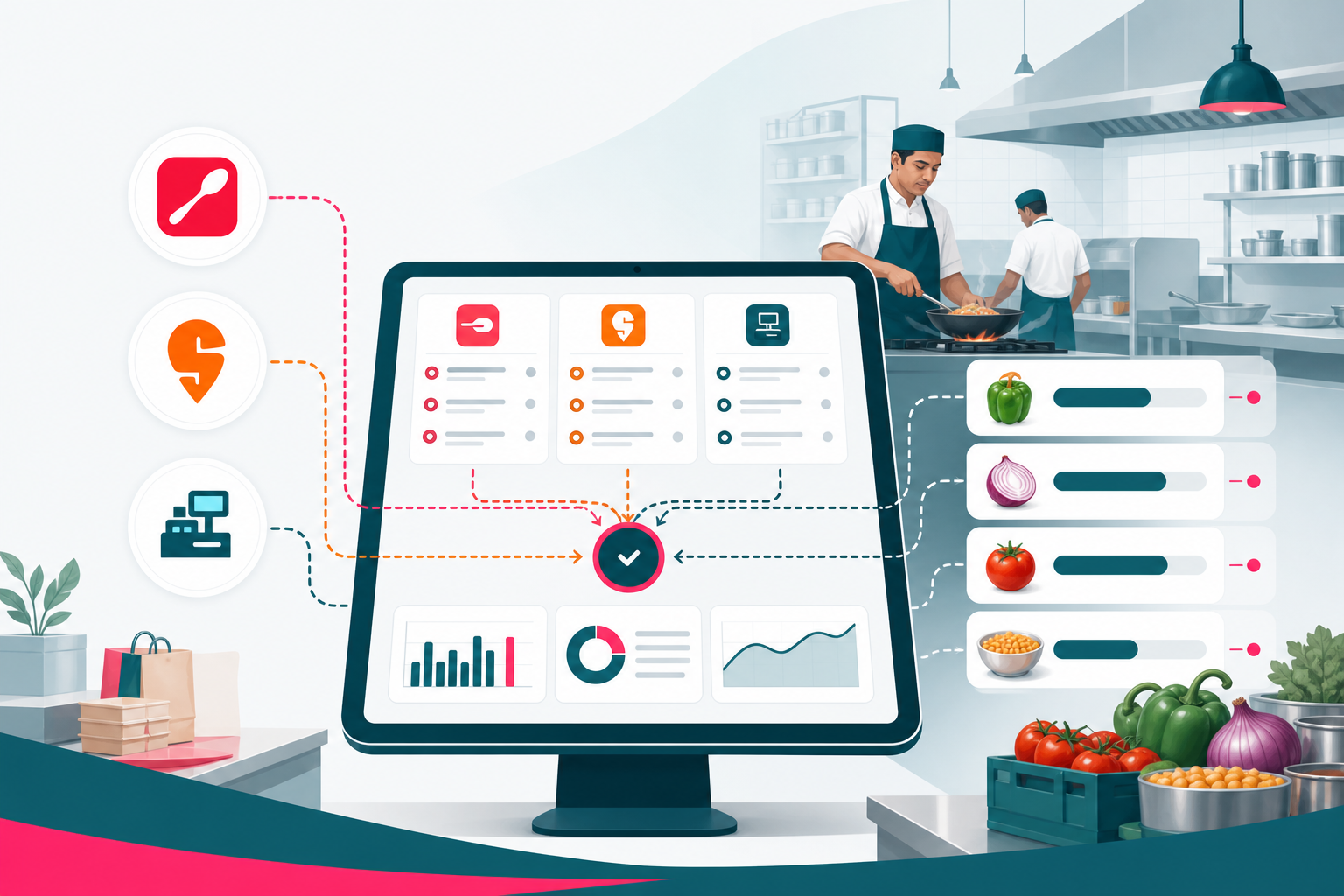
Zomato Swiggy inventory integration means your restaurant software talks to aggregator order APIs and your POS in real time. When something changes in one place, every channel updates.
1. Unified order queue (one kitchen board, not three tablets)
Orders from Zomato, Swiggy, dine-in POS, takeaway counters, and in-house delivery land in one order management queue. Kitchen staff see a single ticket flow—sorted by prep time, outlet, and priority—not three separate apps fighting for attention.
2. Live menu availability tied to stock
When an ingredient hits zero—or a finished dish sells out—the item can auto-pause on Zomato and Swiggy. No more accepting orders for butter chicken when the kitchen ran out of cream twenty minutes ago.
3. Recipe-based ingredient deduction at POS
Every sale—whether it comes from a dine-in register or an aggregator ticket—deducts ingredients based on your recipe costing setup. Sell one biryani portion, and rice, spices, protein, and packaging drop from live stock automatically.
4. Multi-outlet inventory sync
Franchise and multi-branch operators see stock, orders, and food cost by location. Transfer stock between outlets. Stop one branch from overselling while another has surplus.
5. GST-ready billing alongside aggregator ops
Indian restaurants need clean billing workflows—dine-in GST invoices, vendor purchase records, and settlement tracking. A connected restaurant POS inventory system keeps financial data aligned with what the kitchen actually moved.
The real cost of disconnected aggregator + POS workflows
Most restaurant owners underestimate how much margin leaks when Zomato, Swiggy, and POS do not share inventory.
- Cancellation penalties and rating damage — Aggregators penalise stores that accept orders they cannot fulfil
- Food waste from poor forecasting — You prep for guesses, not live sales data
- Labour waste on manual entry — Staff spend hours moving orders between systems
- Hidden food cost drift — Ingredient prices change weekly; recipe margins stay frozen in old spreadsheets
- Scaling pain — Opening outlet #4 is brutal when every location runs its own Zomato-Swiggy-POS triangle
Connecting channels is not an IT project for large chains only. Single-outlet QSR brands and cloud kitchens in Mumbai, Bengaluru, Delhi NCR, Hyderabad, and Pune hit these walls as soon as aggregator revenue crosses roughly 30–40% of total sales.
How Zomato Swiggy POS integration works (step by step)
Here is a practical rollout plan Indian restaurant operators use when moving from disconnected tools to a unified restaurant management system.
Step 1: Map your menu to recipes and ingredients
Before connecting aggregators, define each menu item’s recipe: ingredients, quantities, yield, and cost. This is the foundation of accurate stock deduction. Without it, integration only moves orders—not inventory truth.
Step 2: Connect your POS
Link dine-in and takeaway registers so every counter sale updates the same stock pool. Your POS becomes the operational source of truth for in-house revenue and ingredient movement.
Step 3: Connect Zomato and Swiggy order feeds
Integrate aggregator APIs so orders flow in automatically—no manual re-entry. Each ticket should trigger kitchen display, KOT printing, and ingredient deduction the same way a dine-in order would.
Step 4: Sync menu availability across channels
Link finished dishes and key ingredients to aggregator menu status. When stock is low or prep capacity is maxed, pause items on Zomato and Swiggy from one screen.
Step 5: Add vendor POs and GRN tracking
Stock coming in from suppliers should update the same system stock goes out from. Purchase orders, goods received notes (GRN), and vendor pricing belong in the same platform—not a separate WhatsApp thread.
Step 6: Review food cost and aggregator margin weekly
Once channels are connected, compare sales by source: dine-in vs Zomato vs Swiggy. See which dishes make margin after aggregator commissions—and which menu items you should promote, reprice, or retire.
ElintOm’s restaurant platform covers this full workflow: recipe costing, POS sync, Zomato and Swiggy order integration, vendor POs, and branch-level reporting.
Key features to look for in restaurant aggregator integration software
Not every POS or inventory tool in India handles food delivery integration well. When you evaluate Zomato Swiggy integration software, ask about these capabilities:
| Feature | Why it matters for Indian QSR |
|---|---|
| Real-time order sync | Aggregator tickets appear instantly—no manual entry lag during rush hours |
| Recipe-level stock deduction | Track food cost accurately, not just “units sold” |
| Auto menu pause | Stop overselling when ingredients or prep capacity run out |
| Multi-outlet dashboard | Franchise operators see every branch’s stock and orders in one view |
| Vendor PO + GRN | Close the loop from supplier delivery to kitchen consumption |
| GST billing support | Keep dine-in and back-office billing aligned with Indian compliance needs |
Zomato vs Swiggy: integration differences restaurant owners should know
Both platforms accept orders and manage delivery logistics, but your restaurant inventory software should treat them as two sales channels feeding one kitchen—not two separate operations.
Zomato integration priorities
- Menu sync across dine-in, delivery, and takeaway categories
- Order status updates back to the platform (accepted, preparing, ready)
- Outlet-level availability for multi-brand cloud kitchens
Swiggy integration priorities
- High-volume rush-hour order throughput without kitchen bottlenecks
- Accurate prep time and item availability to reduce cancellations
- Stock-aware menu management during peak dinner windows
What both need from your POS
The same thing: one inventory count, one order queue, one recipe database. Whether the ticket says Zomato or Swiggy should not change how your kitchen fulfils it or how your stock updates.
Who benefits most from Zomato Swiggy POS integration in India
- Cloud kitchens running multiple brands on one production line
- QSR franchise chains with 3–50 outlets across cities
- Dine-in + delivery restaurants where aggregators drive 30%+ of revenue
- Fast-casual and casual dining brands scaling from one outlet to multi-city
- Hotel F&B operations managing room service, restaurant POS, and aggregator delivery together
If you are still reconciling aggregator sales in Excel every Sunday night, you are already paying for integration—you are just paying in labour, cancellations, and margin leakage instead of software.
Common mistakes when connecting Zomato, Swiggy, and POS
Mistake 1: Integrating orders but not recipes. You get a unified ticket board but still cannot trust food cost numbers. Always connect orders to recipe-level deduction.
Mistake 2: Treating each outlet as a separate island. Multi-branch brands need central visibility. Local fixes do not scale.
Mistake 3: Ignoring vendor inbound stock. Outbound sync is half the story. If supplier deliveries are not recorded, availability drifts within days.
Mistake 4: Manual menu updates per platform. If pausing a dish means logging into Zomato, Swiggy, and POS separately, your team will skip it during rush hour—and oversell.
Mistake 5: Choosing generic retail inventory tools. Restaurants need recipe costing, yield tracking, and kitchen workflows—not shoebox SKU counting built for fashion or electronics.
How ElintOm connects Zomato, Swiggy, and POS for Indian restaurants
ElintOm Software for restaurants and QSR is built for the exact workflow Indian food businesses struggle with:
- Recipe costing tied to live ingredient stock — costs update when vendor prices change
- Auto ingredient deduction at every POS sale — dine-in, takeaway, and delivery
- Zomato, Swiggy, and in-house orders in one queue — one kitchen board, not three tablets
- Vendor purchase orders with GRN tracking — stock in and stock out in the same system
- Multi-outlet dashboards — franchise and cloud kitchen operators see every location
- API-first architecture — connects alongside existing tools without a full rip-and-replace
ElintOm is developed by Sateri Digital, with 25+ years of enterprise software experience across India, the US, and the UAE—so rollout support matches how Indian restaurant teams actually work.
90-day rollout checklist for aggregator + POS integration
- Week 1–2: Audit menu, recipes, and top 20 ingredients by cost
- Week 3–4: Connect POS and migrate dine-in/takeaway workflows
- Week 5–6: Integrate Zomato and Swiggy order feeds; test during non-peak hours
- Week 7–8: Enable stock-aware menu pausing on aggregators
- Week 9–10: Add vendor PO and GRN workflows
- Week 11–12: Review food cost, cancellation rate, and margin by channel; optimise menu
Most single-outlet QSR brands connect core channels in weeks, not months, when using restaurant-focused software rather than custom middleware.
Frequently asked questions
What is Zomato Swiggy inventory integration?
It is software that connects Zomato and Swiggy order feeds to your restaurant POS and kitchen inventory—so aggregator sales, dine-in tickets, and ingredient stock all update from one shared system in real time.
Can I connect Zomato and Swiggy without replacing my POS?
Often yes. API-first platforms like ElintOm integrate with existing POS and restaurant systems so you connect aggregators without shutting down operations for a full system replacement.
How does integration stop overselling on Swiggy and Zomato?
When ingredient or finished-dish stock hits zero, menu items can auto-pause on aggregator platforms. Orders are only accepted for dishes your kitchen can actually prepare.
Does this work for cloud kitchens with multiple brands?
Yes. Multi-brand cloud kitchens benefit most—one production kitchen, several aggregator storefronts, and one inventory pool that must stay accurate across all of them.
Is recipe costing necessary for aggregator integration?
Order sync alone helps the kitchen. Recipe costing helps the business—you see real food cost per dish, per channel, per outlet. Both together protect margin.
Does ElintOm support GST billing for Indian restaurants?
ElintOm supports restaurant billing and operational workflows for Indian QSR and dine-in brands alongside inventory, POS sync, and aggregator order management.
How long does Zomato Swiggy POS integration take?
Many restaurants connect core channels in a few weeks. Timeline depends on menu complexity, number of outlets, and how clean your recipe and ingredient data is at the start.
Next step: Book a restaurant demo and we will map ElintOm to your outlets, Zomato and Swiggy accounts, POS setup, and kitchen workflow—or contact our India team with your current stack and we will outline the integration path.

Write a Comment
Join the omnichannel commerce discussion. Your email address will not be published.
Comment Submitted
Thank you! Your comment has been successfully received and is awaiting database admin moderation.
Form: Article Comment Form